For invoice recipients
You received an invoice sent with Dicopay.
Dicopay is the invoicing software a business used to send you that invoice. We are not a debt collector and we did not decide what you owe. This page explains who we are, how to pay, and what to do if the invoice does not look right to you.
Who we are
Our name is on the invoice. The work was done by someone else.
Dicopay AB is a Swedish software company. Small businesses use us to write invoices, send them, and send the reminders that follow. The invoice you received names the business that did the work, and that business set the amount and the due date.
Why you got a message from us
The business you hired sends its invoices through Dicopay instead of writing them by hand. The invoice, the reminder before the due date, and the reminder after it all come from our system on that business's behalf.
What we are not
We are not a debt collection agency, we are not a bank, and we are not a lender. We did not buy your debt, we cannot add a fee to your invoice, and we cannot change a single line on it.
The sender is a verified account
Every Dicopay account goes through an identity check before it can send anything. In Sweden, a business signs up with BankID. 3,000 Swedish businesses have onboarded to Dicopay since launch.
If the business was paid early on your invoice, nothing changes for you.
Some businesses choose to be paid early on an invoice by an independent regulated lending partner. Dicopay is not a lender. Eligibility, pricing, and terms for that are set by the funding partner and disclosed to the business before it accepts. Your invoice keeps the same amount, the same terms, and the same due date, and you keep paying using the details printed on the invoice itself.
Viewing and paying
You do not need an account, a password, or an app.
There is nothing to sign up for. You open the invoice from the link in the message, read it, and choose how to pay. That is the whole process.
Open the link in the message
The email or text you received carries a link to your invoice. It opens in your browser on a phone or a computer. You are not asked to create an account and you are not asked for a password.
Check what it says
The invoice names the business that sent it, describes the work or the goods, and shows the amount, the tax, and the due date. Compare that against what you agreed with them before you pay anything.
Approve it and choose how to pay
You confirm the invoice on your phone and pick one of the payment options below. Pay using the details shown on the invoice, and nowhere else.
Keep the confirmation
Save or print the confirmation screen and the invoice for your own records. If reminders keep arriving after you have paid, that confirmation is what settles it fastest.
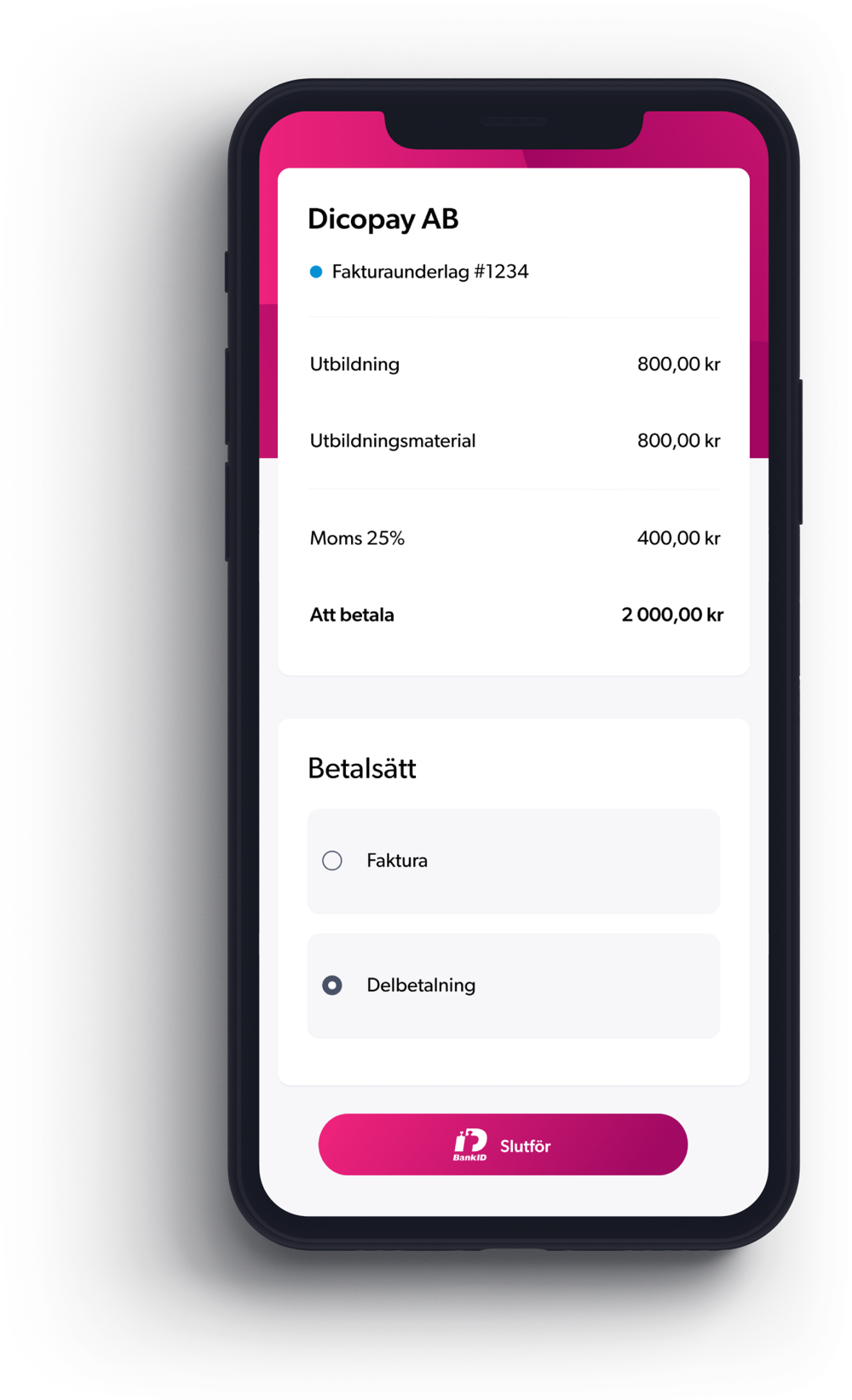
Payment options
Three ways to settle the invoice.
Which options appear depends on the invoice and on the business that sent it. You choose on the screen above, and you are shown the terms of each option before you pick one.
Pay in full
You settle the whole amount now, using the payment details on the invoice. Nothing further is owed and the reminders stop.
Pay on invoice, up to 60 days
You take the goods or the finished work now and pay later, up to 60 days out. The due date you agree to is shown on screen before you confirm.
Pay in installments
You split the amount across several payments. The number of payments, the size of each one, and any cost are shown to you before you accept.
Who provides the option you pick.
Paying in full sends your money to the business that invoiced you, using the details on the invoice. Paying later or in installments involves a credit decision, so that option is provided by an independent regulated lending partner. Dicopay is not a lender. The partner sets eligibility, pricing, and terms, and discloses them to you in full before you accept. If you do not want a credit decision, pay in full and none of that applies.
If something is wrong
Talk to the business that sent the invoice, not to us.
Wrong amount, work you did not order, a job that is not finished, a price you did not agree to: all of that sits between you and the business. We send the document. We do not have the contract, the site visit, or the conversation you had with them.
What the business can do
They can correct the amount, credit the invoice, change the due date, cancel it, or explain a line you do not recognize. Their name, and usually a phone number and an email address, are printed on the invoice you received.
Put the invoice number in your first message to them. It is the fastest way for them to find the record.
What we can do
We can confirm that an invoice was genuinely sent through Dicopay and help with a link or a screen that will not load. We cannot change an amount, cancel an invoice, or settle a disagreement about the work, because none of that is ours to decide.
Reminders keep running on their schedule until the business marks the invoice as settled or cancels it, so contact them first.
Checking that a message is real
How to tell a real Dicopay message from a fake one.
Fake invoices and payment redirection scams exist, and being careful about a message you did not expect is the right instinct. Here is what a genuine message from us does and does not do.
| What to look at | A genuine Dicopay message | A fraudulent message |
|---|---|---|
| Who it names | A real message names the business that did the work, and it gives an invoice number and an amount. | A fake message refers only to your invoice or your account, and it names no business. |
| What it asks you for | A real message asks you to open the invoice and pay it. | A fake message asks you for a password, a bank login, or a one-time security code. |
| Where the link goes | A real link points to our own website at [to confirm]. | A fake link points to a lookalike address, or it hides inside a shortened link. |
| Payment details | The details sit on the invoice itself, and they do not change partway through. | A fake message tells you the bank account has changed and asks you to pay somewhere new. |
| Tone | A real reminder refers to the due date and repeats what the invoice already says. | A fake message threatens legal action, arrest, or a penalty within the hour. |
Swipe the table sideways to see every column.
Three things we will never do
We will never ask you for a password, a bank login, or a one-time code. We will never call and ask you to move money to a safe account. We will never send you new bank details in a text message.
If you are unsure, stop and check
Do not use the link in the message. Call the business you hired on a number you already had, and ask whether they invoiced you. If they did not, delete the message and report it to your bank. If you did not hire anyone recently, the invoice is not yours to pay.
Questions from invoice recipients
The questions people ask when our name turns up.
I have never heard of Dicopay. Why is your name on my invoice?
Because the business you hired writes and sends its invoices with our software. Think of us as the paper the invoice is printed on. The company you dealt with is the one you owe, the one that set the amount, and the one to talk to about the work. Dicopay AB is registered in Göteborg, Sweden, and our invoicing app is live in Sweden today.
Do I need an account to pay?
No. You do not create an account, you do not choose a password, and you do not install anything. You open the link, read the invoice, approve it on your phone, and pay. That is deliberate: a person paying an invoice should not have to sign up for software to do it.
Where does my money go?
You pay using the details shown on the invoice, and nowhere else. If Dicopay or a partner is collecting on behalf of the business, the invoice says so and shows the account to pay to. If any later message asks you to send the money somewhere different, treat it as fraud and check with the business first.
Can I pay later or split the payment?
Often, yes. Depending on the invoice, you can pay in full, pay on invoice up to 60 days, or pay in installments. The options you have are listed on the invoice screen. Paying later or in installments involves a credit decision made by an independent regulated lending partner, which sets the eligibility, the pricing, and the terms and discloses them to you before you accept. Dicopay is not a lender.
The invoice is wrong, or I did not order this.
Contact the business named on the invoice. They can correct it, credit it, or cancel it. We cannot, because we did not do the work and we do not hold your agreement with them. If you did not hire anyone and cannot identify the sender at all, do not pay and do not use the link. Read the section above on spotting a fraudulent message.
Why do I keep getting reminders?
Dicopay sends automatic reminders before the due date and after it, on behalf of the business. They stop when the invoice is settled or when the business cancels it. If you have already paid, send the business your payment confirmation and ask them to mark it as paid. We cannot mark someone else's invoice as paid for them.
What do you do with my personal data?
We process what is needed to deliver the invoice and take the payment, on behalf of the business that invoiced you. What we hold, why, and how long we keep it is set out in our privacy policy. If a message about an invoice is one you no longer want, the SMS terms explain how text messages from us work.
Still stuck
Where to take it next.
Start at the top of this list. Most questions about an invoice are answered by the business that sent it, and they can answer them faster than we can.